A Lightroom-style editor for RAW photos
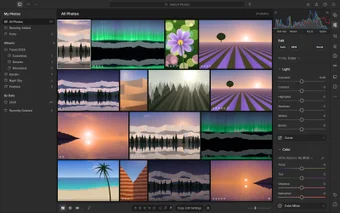
LightCraft is a multimedia application that offers a free way to edit RAW photos. It has an interface that takes inspiration from Lightroom. It’s also open source and doesn’t require an account, so there’s no sign-up process to get through before you start editing.
For Lightroom users, getting comfortable with LightCraft should be relatively easy. Most of the main controls are arranged in similar places, which can make it easier to navigate the application and get started with your edits without having to relearn the basics of a photo-editing interface.
Familiar sliders, presets, and masking
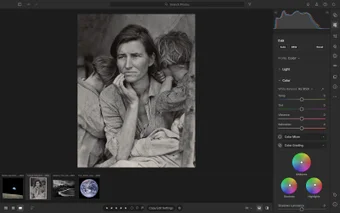
LightCraft covers the editing basics well. For light, you can tweak exposure, contrast, highlights, shadows, whites, and blacks. For effects, there’s texture, clarity, and dehaze, and for color you get saturation, tint, vibrance, and temperature. It also has an 8-band color mixer and 3-way color grading wheels, so you can go beyond quick fixes and shape the mood of a photo.
If you want a shortcut, there are 18 presets to try, sorted by style. Color presets include Warm Glow and Vivid Pop, landscape presets include Golden Hour and Blue Hour Boost, and portrait presets include Bright and Airy and Soft Skin. The photo library makes it easy to browse and manage your collection, and editing is non-destructive, so your original image never changes permanently.
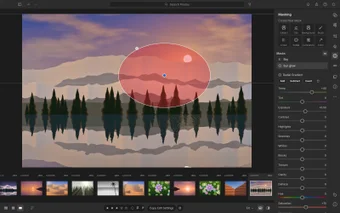
Masking is a big part of the toolkit. You can use brush, linear, and radial gradients, luminance and color ranges, and even sky, subject, and background masks. However, this feature is one of the weakest spots of this tool. It isn’t very reliable at isolating subjects, so it requires more manual refinement. You can install LightCraft through the ArtCraft Launcher, which also gives you other crafting apps, or grab it as a standalone tool.
A free alternative
Overall, LightCraft is a great fit for photographers who know Lightroom but want a free, no-account alternative. What makes it stand out is the familiar layout paired with open-source code, so there’s almost no learning curve and nothing to pay. If you rely on quick subject selections, the masking may frustrate you, but for everyday RAW edits, it’s well worth a try.